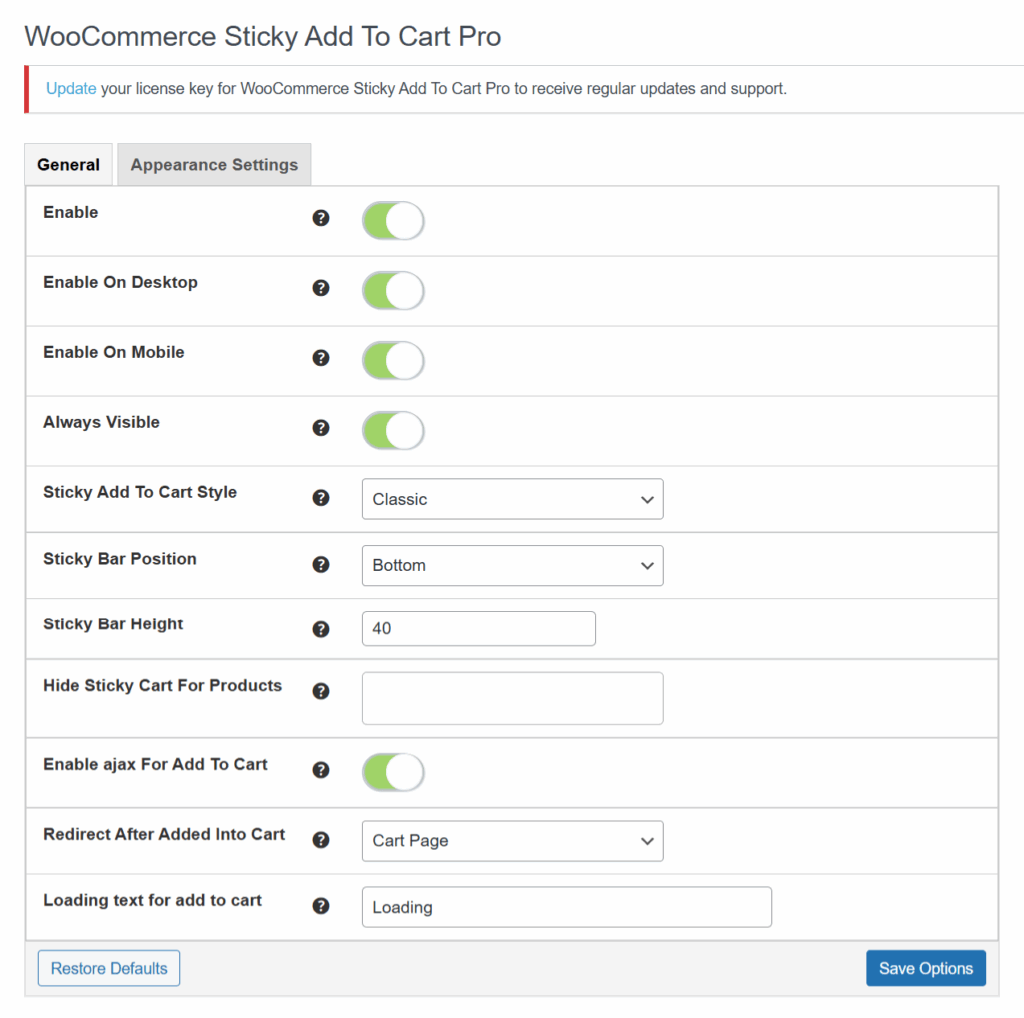
🛒 General Settings #
✅ Enable #
This option enables or disables the sticky add to cart bar functionality. Toggle it ON to activate the plugin features.
💻 Enable On Desktop #
When enabled, the sticky cart bar will be displayed for desktop users.
📱 Enable On Mobile #
Enable this setting to show the sticky add to cart bar on mobile devices. Great for improving mobile conversions.
👁️ Always Visible #
If this is enabled, the sticky cart bar remains visible at all times while scrolling. If disabled, it may appear based on scroll behavior.
🎨 Sticky Add To Cart Style #
Choose between different display styles of the sticky cart bar. Available options may include:
-
Classic (default)
(Other styles may be available depending on plugin updates.)
⬇️ Sticky Bar Position #
This controls where the sticky cart bar appears:
-
Top – shows the bar at the top of the page.
-
Bottom – shows it at the bottom (default and most common usage).
📏 Sticky Bar Height #
Define the height (in pixels) for the sticky bar. For example, 40 will set the height of the bar to 40px.
🙈 Hide Sticky Cart For Products #
Specify product IDs (comma-separated) where you do not want the sticky cart bar to appear. Useful for excluding certain items.
⚙️ Enable AJAX For Add To Cart #
When enabled, the product will be added to the cart without page reload, making the user experience smoother and faster.
🔁 Redirect After Added Into Cart #
Choose where users are redirected after adding an item to their cart:
-
Same Page – no redirection
-
Cart Page – takes user to the cart
-
Checkout Page – redirects directly to checkout
🔄 Loading Text For Add To Cart #
Customize the loading message that appears when a product is being added to the cart (via AJAX). Default is “Loading”.